The column, “Parameters” and the column, “Prices” creates the most important possibility for assigning the file characteristics.
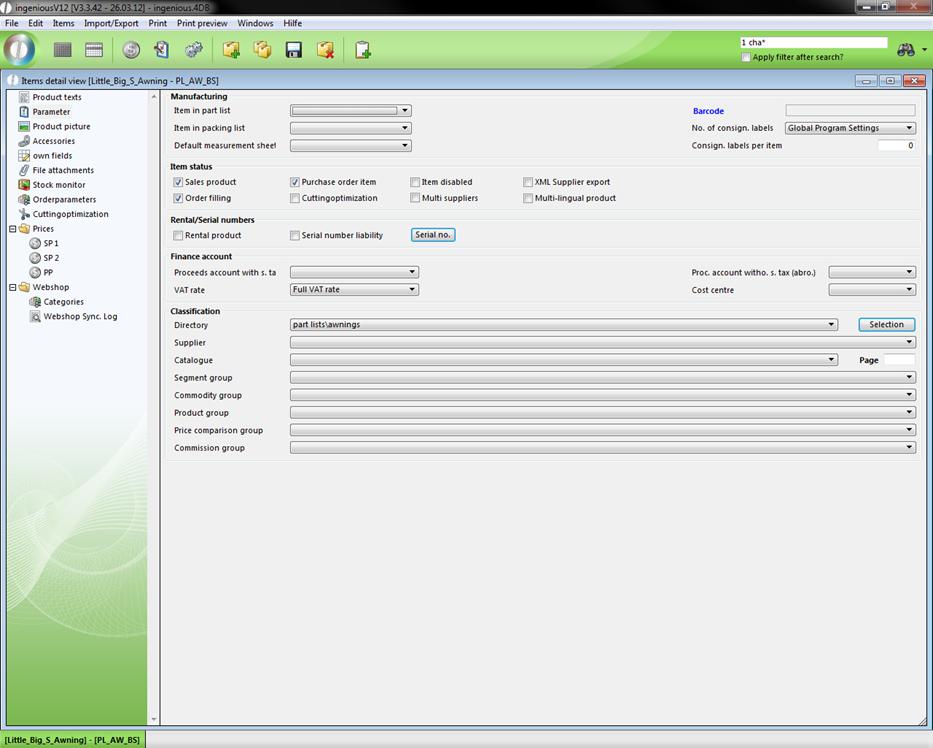
In this column, the areas, “Manufacturing”, “item status”, “Rent/Serial number”, “Finance account” and “Classification” are included. In the area, “Manufacturing”, you can confirm the “Position in the packing list” and the standard measurement sheet. The bar code of the item can also be added and the number of commission labels can be determined. In the area, “item status”, you can specify if the item is a “Purchase order item” or a “Sales product”. Also, the locking of the item is possible with a mouse-click on the check box “items disabled”. You can also activate the item for the XML Supplier Export such as the order commissioning (with the sale of the item it is again ordered immediately) and assign the cut optimization. In the area, “Renting/Serial number liability”, it can be determined whether the item is available as a “Rental product” and serial numbers can also be assigned. In the area, “Finance account”, you can still assign the item another proceeds account as well as a VAT rate and a cost center. In order to assign a specific listing of the item catalogue, simply select this in the area “Classification” from the “Folder” selection field. The selection fields of this area such as “Supplier”, “Commodity group”, “Catalogue”, “Page”, “Product group”, “Price comparison group” and “Commission group” provide the basis for the exact classification of the item. If the item is characterized as an order item, you have to the possibility to add its order number here.